Features
AI UGC VIDEO GENERATOR
Create UGC-style product videos without a new shoot.
Give your products a voice or an everyday setting with AI-generated, creator-style videos. Start with your store homepage URL, review the ideas and choose a compatible pitch, unboxing or try-on format before generating.
For the product that needs a voice, a demonstration or an everyday setting.
I have a product photo and know the format →Unboxing
Mirror try-on
Everyday style
AI-generated, creator-style examples.
From your store to a product story people can follow.
- 01
Let your store supply the product context
Paste your store homepage URL. Review the products, images and descriptions brought into your library. Start from the information already on your store instead of assembling a new image folder.

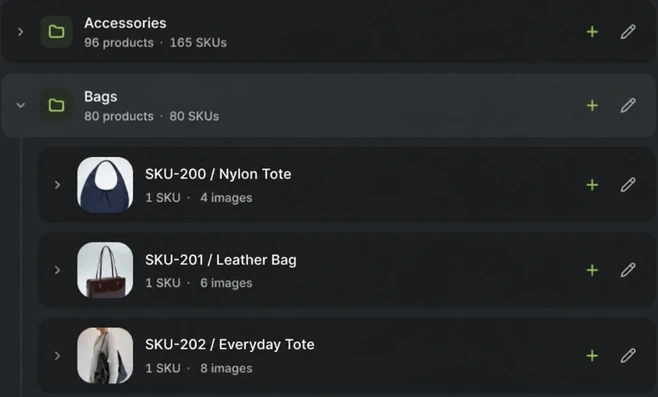
Product UI · Imported catalogue and product references - 02
Match the message to a delivery
Review the concepts in your Playbook and choose a suitable UGC-style recipe. Decide what the viewer needs to understand: how the product looks on someone, what comes in the box or why a feature is useful. Check the recipe's inputs and adjust the concept before generating.
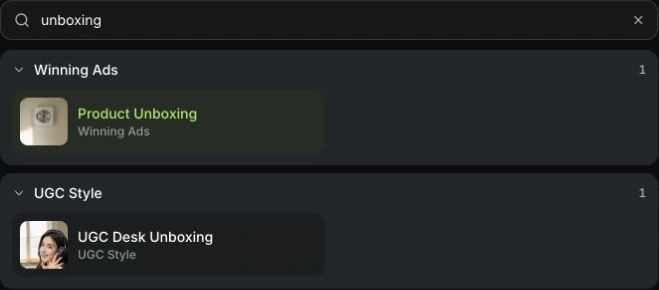
Product UI · Choosing the UGC Desk Unboxing format - 03
Watch the delivery, then finish the video
Generate a selected row. Review the product, presenter delivery, sound and captions as one piece. Refine the cut and on-screen details in the editor, then export for your feed or advertising workflow.
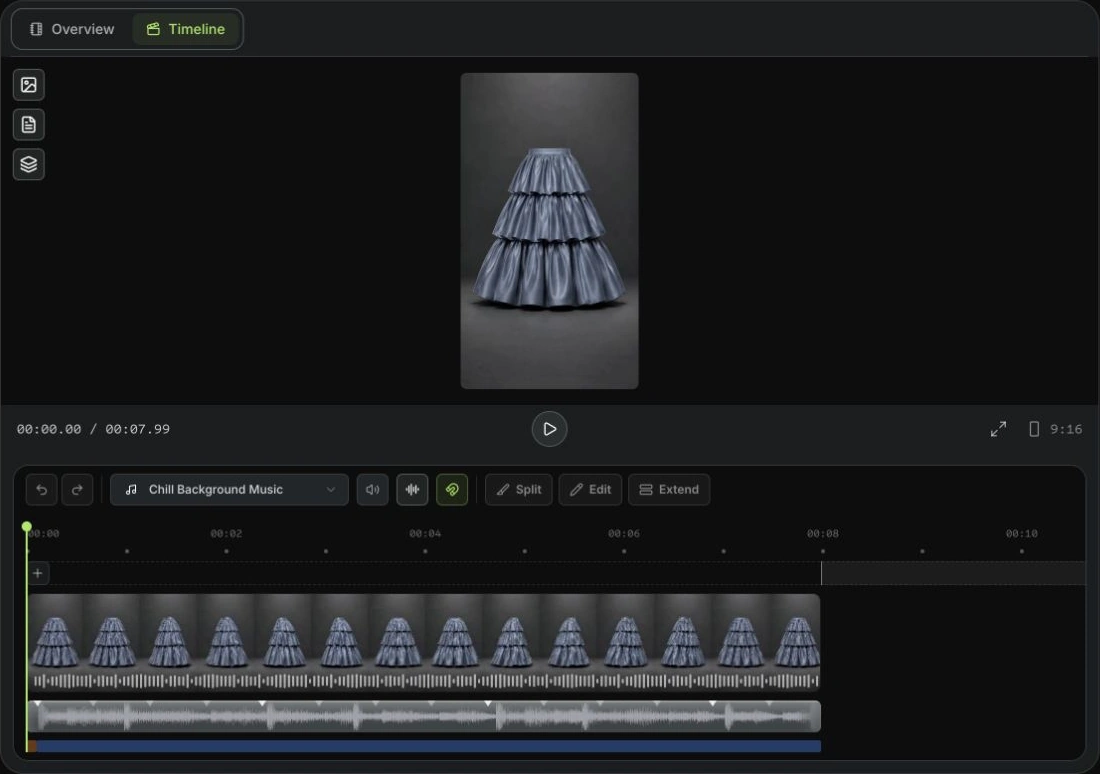
Product UI · Video and audio timeline; product-video example
02 · UGC video recipes
The way it is told changes what the viewer notices.
A direct pitch explains. An unboxing reveals. A try-on puts the product in context. Choose the delivery that answers the question behind the purchase.
Product Pitch
AI-generated · Recipe example
Let an AI-generated presenter introduce one useful product benefit directly to camera. Keep the message specific and easy to follow.
Desk Unboxing
AI-generated · Recipe example
Bring the packaging and product into a familiar desk scene. Show the reveal and handling in a casual, creator-style format.
Mirror Try-On
AI-generated · Recipe example
Put a wearable product into an everyday outfit moment. Review the generated fit, colour and details against the actual item.
03 · What you can make
Give each product a useful point of view.
Explain the feature a listing leaves unclear
A photo can show the product without explaining why a detail matters. Build a creator-style pitch around one feature and the situation it helps with, using facts you can check.
AI-generated · Example content
Make the unboxing part of the story
For a gift or seasonal launch, the reveal can be part of the appeal. Use a suitable unboxing format and review that the generated packaging and contents match what you actually sell.
AI-generated · Example content
Put a wearable product into an everyday moment
A mirror try-on gives an outfit a different context from a catalogue shot. Choose a compatible product and recipe, then review how the item looks in the scene.
AI-generated · Example content
Tell the same story another way
Use the saved product for another concept: a direct explanation in one piece, a demonstration in the next. Generate the versions you choose and decide which delivery fits your own channels.
AI-generated · Example content
04 · Why Snaptale
Keep the product at the heart of the story.
Match the delivery to the question
Choose a direct pitch for an explanation, an unboxing for the reveal or a compatible try-on for an outfit moment. The format gives the product a specific way to be understood.
Keep the product central to the scene
Use the selected product reference in the concept. Review how it appears on camera: its shape, its details and how the presenter handles or wears it.
Review the voice with the delivery
For a speaking format, check the generated voice, lip sync and captions together. Make sure the words and visible demonstration tell the same product story.
Finish the story in your brand's voice
Review the wording and pacing, then refine the cut and on-screen text in the editor. Keep the explanation focused on what the product actually does.
Frequently asked questions
Do I need product photos before I start?
No. Begin with your store homepage URL and review the product images imported into your library. Add or replace references when a selected recipe needs something more specific.
Do I need to film myself or hire a creator?
You can make AI-generated creator-style videos without arranging a new shoot. Check the chosen recipe for any product or presenter references it requires.
Is this footage from real customers?
No. These are AI-generated, UGC-style videos. Use them to introduce or demonstrate a product, with factual claims rather than invented customer experiences.
Can I choose how the product is presented?
Yes. Choose a compatible recipe and edit the concept's message. Available presentation options and required inputs depend on the recipe.
Will every product work with every UGC recipe?
No. A try-on, an unboxing and a direct pitch can require different references. Choose a format suited to the product and review its inputs before generating.
Can I use a UGC-style video in an ad?
You can export it for your advertising workflow. Review the claims, AI-content disclosure requirements and the rules of the channel you use before publishing.
Can I make another version without uploading the product again?
Yes. Reuse the saved product in another concept and choose a different message or compatible format. Generate each selected piece separately.
Will the product look exactly right?
Review the result against the actual item. Fine text, logos, proportions and small details can vary in generated footage.
Find the next story your products can tell.
Paste your store link. Review the ideas, choose the creator-style pieces and make them one by one.
Start planningAlready have the photo and format? Start with a recipe →
AI-generated, creator-style content.